
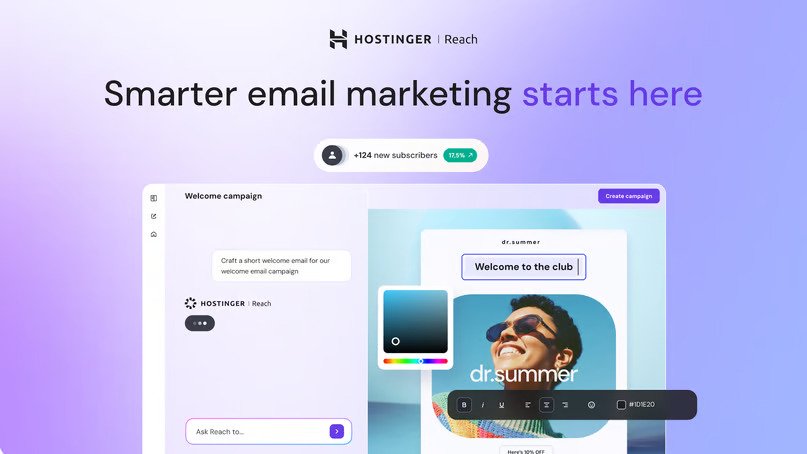
Hostinger Reach Review 2026: AI Email Marketing Tool, Features, Pricing & Best Plan for Creators
🚀 Want to Grow Your Podcast, Newsletter or Online Business? Meet Hostinger Reach!
Imagine this: You spend hours recording an amazing podcast episode, creating a YouTube video, writing a blog post or launching a new product. People discover your content, but what happens after they leave your website?
They might forget your brand, miss your next episode or never return to your website.
What if you could build an email audience and reconnect with people who genuinely want to hear from you?
That is where email marketing comes in.
With Hostinger Reach, you can create professional email campaigns with AI assistance, manage subscribers, send newsletters and monitor campaign performance without needing to be an email marketing expert.
Whether you are planning to launch your first podcast, grow a YouTube channel, promote affiliate products, sell online courses or build a small business, an email list can become a valuable part of your long-term growth strategy.
👉 Ready to explore your plan?
🚀 CHOOSE YOUR HOSTINGER REACH PLAN
Check the current price, included limits and billing terms on Hostinger’s checkout page before purchasing.
📩 What Is Hostinger Reach?
Hostinger Reach is an AI-powered email marketing platform designed to help creators, entrepreneurs and businesses communicate with their audiences through branded email campaigns.
Instead of starting with a blank email template, you can describe what you want to communicate and use AI to help generate campaign content and layouts.
Depending on your selected plan, you can access tools for:
- ✨ AI-powered email creation: Get help drafting and designing email campaigns.
- 📬 Newsletter marketing: Share podcast episodes, blog posts, updates and announcements.
- 👥 Subscriber management: Organize your email audience.
- 📊 Campaign analytics: Track opens, clicks and engagement.
- 🎨 Brand customization: Create emails that reflect your business identity.
- 🔄 Email automation: Set up supported automated messages and follow-up sequences.
- 📝 Signup forms: Collect subscribers through supported forms and integrations.
You can explore the official product page here: Hostinger Reach Email Marketing.
My take: If you regularly publish content but do not have a system for bringing your audience back, email marketing deserves a place in your content strategy.
🎙️ Why Podcasters Should Consider Hostinger Reach
Starting a podcast is exciting. You choose a topic, buy or arrange recording equipment, plan episodes and publish your first recording.
But creating episodes is only one part of building a successful podcast. You also need to develop a relationship with your listeners.
Social media platforms can help you get discovered, but your reach can fluctuate. An email newsletter gives interested listeners another way to hear from you.
Here are a few practical ways to use Hostinger Reach for podcast marketing.
1. Announce Every New Podcast Episode
Imagine publishing a new episode about entrepreneurship, personal finance, technology or productivity.
Instead of waiting for people to discover it on their own, you can send an email to subscribers who opted in to receive your updates.
Your newsletter might include:
- The episode title and topic.
- A short summary of the discussion.
- Three useful takeaways.
- A link to listen to the full episode.
- A question inviting readers to share their thoughts.
Example subject line: “🎙️ New Episode: 5 Lessons Every First-Time Entrepreneur Should Know”
The goal is to make it easy for interested subscribers to find your latest content.
2. Build a Loyal Podcast Community
A podcast becomes more valuable when listeners feel involved.
You can use email newsletters to ask questions, collect topic suggestions, share behind-the-scenes stories and announce upcoming guests.
For example:
“Which topic should we discuss in our next episode: AI tools, digital marketing or starting a business?”
You can then use audience feedback to help plan future episodes.
3. Promote Your Podcast Without Depending Only on Social Media
You can share podcast clips on Instagram, YouTube Shorts and other social platforms while inviting interested people to subscribe to your newsletter.
Over time, this creates another communication channel for your audience.
Remember, an email list does not guarantee more downloads. The results depend on the quality of your content, audience interest, email deliverability and how relevant your messages are.
4. Promote Podcast Sponsorships, Courses and Digital Products
Once you have an engaged audience, your newsletter may also help you introduce relevant offers.
These could include:
- Podcast sponsorship opportunities.
- Digital courses and workshops.
- Affiliate products you genuinely recommend.
- E-books and downloadable resources.
- Consulting or coaching services.
- Your own digital products.
Important: Build trust first. Send useful content consistently, disclose affiliate relationships and avoid turning every email into a sales pitch.
🎧 Planning Your First Podcast Setup?
Before investing in email marketing, make sure you have a content plan and a way to publish your episodes consistently.
You may also like our guide: Best Podcast Equipment for Beginners on a Budget (2026): 10 Must-Have Gadgets.
🤖 Hostinger Reach Features: What Do You Get?
Let’s look at the features that may make Hostinger Reach useful for creators and small businesses.
AI-Powered Email Campaign Creation
Writing marketing emails from scratch can take time, particularly if you are new to copywriting.
Hostinger Reach can help generate campaign drafts and email designs based on the information and goals you provide.
For example, you might describe a campaign announcing a new podcast episode or promoting a newsletter.
You should still review the AI-generated content, correct any inaccurate details, adjust the tone and ensure that every link works before sending.
Pro tip: Give AI a specific objective, target audience and desired action. A detailed prompt usually gives you a better starting point than a vague instruction.
Professional, Branded Email Designs
Consistent branding helps subscribers recognize your business.
Hostinger Reach provides tools to customize email designs with your brand details, including supported logo and color settings.
You can use this to create a more consistent experience across newsletters, announcements and promotional campaigns.
Subscriber Management
An email marketing platform is more useful when you can organize your audience and communicate with the right people.
Hostinger Reach supports subscriber management, with limits determined by the selected plan.
For example, a small podcast might begin with a few hundred subscribers, while a growing creator could need capacity for 1,000 or more.
Always check both the unique subscriber limit and the monthly email-sending limit. They are different measurements.
Campaign Analytics
Sending an email is only the beginning. You also need to understand whether subscribers are engaging with it.
Hostinger Reach offers campaign analytics such as opens and clicks.
These metrics can help you compare subject lines, links and content formats over time. However, open rates are estimates and can be affected by privacy features and email-client behavior. Clicks and meaningful audience actions should also be considered.
Email Marketing Automation
Automation can help you communicate with subscribers without manually sending every message.
Depending on the plan and supported workflow, you may be able to set up welcome emails, follow-up sequences and other automated campaigns.
For a podcast, a welcome sequence might look like this:
- Email 1: Welcome new subscribers and explain what they will receive.
- Email 2: Share your most useful or popular episode.
- Email 3: Ask subscribers which topics interest them.
- Email 4: Recommend a relevant resource or invite them to an event.
Start with a simple sequence. Make sure subscribers have consented to receive your emails and that they can unsubscribe.
Website and Contact Integrations
Hostinger Reach can work with supported website connections and contact-import methods.
Depending on your setup, you may be able to connect a supported Hostinger website, integrate WordPress, upload contacts using a CSV file or use the available API.
This can help creators collect subscribers and manage them in one email marketing workflow.
If you use WordPress, you may also want to read Hostinger AI Automation Apps Review 2026 to explore related tools.
Feature availability can vary by plan and integration. Check Hostinger’s official documentation before purchasing.
💰 Hostinger Reach Pricing: Reach 500 vs Reach 1000 vs Reach 2500
One of the most important decisions is choosing the right subscriber capacity.
You have provided referral checkout links for three options—Reach 500, Reach 1000 and Reach 2500—with 1-month, 12-month and 24-month billing selections.
The exact amount payable is not listed here because pricing, discounts, taxes and checkout terms can change. Open the relevant link to see the current offer before you complete your purchase.
Reach 500: A Practical Starting Point for a Small Audience
Best for: New podcasters, beginner creators, solo entrepreneurs and small newsletters.
If you are launching your first podcast or have only recently started collecting email subscribers, a 500-subscriber capacity may be a sensible starting point.
It can suit a small audience that you want to update about:
- New podcast episodes.
- Blog posts and useful resources.
- New YouTube videos.
- Workshops and webinars.
- Relevant product launches.
According to Hostinger’s plan documentation, Reach 500 includes capacity for 500 unique subscribers and 3,500 emails per month. Check the current plan details before purchasing because plan limits may change.
Choose your billing period:
Tip: If you are not sure how quickly your email list will grow, compare the total checkout cost and renewal terms before choosing a longer billing period.
Reach 1000: For Growing Podcasts and Creator Businesses
Best for: Creators with a growing audience, bloggers, consultants and small businesses.
Suppose your podcast has started attracting regular listeners, or your website is generating more newsletter signups.
A 1,000-subscriber plan can give you more room to communicate with that audience, provided the included sending capacity also matches your campaign frequency.
Potential uses include:
- Weekly podcast newsletters.
- Educational email series.
- Product updates and launches.
- Event announcements.
- Relevant affiliate recommendations.
- Subscriber re-engagement campaigns.
Hostinger’s published plan information lists Reach 1000 with capacity for 1,000 unique subscribers and 7,000 emails per month. Confirm the current limits at checkout.
Choose your billing period:
Before upgrading, consider how many people you actually email and how often you send campaigns. A bigger plan is useful only when you need its extra capacity.
Reach 2500: For Established Creators and Larger Lists
Best for: Established podcasts, active newsletters, content businesses and small companies with larger subscriber lists.
If you already have a few thousand subscribers—or you have a realistic plan to grow your list—Reach 2500 may be worth comparing.
It can provide more capacity for regular campaigns, segmented audiences and ongoing content promotion.
Potential use cases include:
- Multiple podcast updates per month.
- A regular business newsletter.
- Educational email sequences.
- Launch campaigns for courses or digital products.
- Updates for an established content community.
- Marketing communication for opted-in customers.
Hostinger’s published plan information lists Reach 2500 with capacity for 2,500 unique subscribers and 17,500 emails per month. Verify the current details and features before buying.
Choose your billing period:
Do not buy extra capacity simply because it is available. Estimate your current list size, campaign schedule and likely growth first.
🧭 Which Hostinger Reach Plan Should You Choose?
Here is a simple way to decide:
Choose Reach 500 if:
- You are launching a podcast or newsletter.
- Your email audience is still relatively small.
- You want to test a consistent email publishing routine.
Choose Reach 1000 if:
- Your audience is growing steadily.
- You publish content regularly.
- You need more subscriber and sending capacity.
Choose Reach 2500 if:
- You already have a larger opted-in audience.
- You send regular campaigns to different subscriber groups.
- You have a clear content or business strategy for that audience size.
The best plan is not necessarily the most expensive one. It is the one that fits your actual audience and expected usage.
⚡ Ready to Start Email Marketing?
If you already have a website, a content plan and people who want to hear from you, you can review the available plans below.
📩 CHOOSE YOUR HOSTINGER REACH PLAN NOW
This link opens the Reach 1000, 12-month checkout option. If you prefer a different capacity or billing period, use the relevant links above. Check the final price and terms before placing your order.
🛠️ How to Get Started With Hostinger Reach
You do not need a complicated marketing system to send your first newsletter. Start with the basics.
Step 1: Choose Your Plan
Review the available subscriber limits, monthly sending allowance, features, billing period and final checkout price.
If you are still validating your idea, check whether Hostinger’s free plan is available to you before paying. The free option has its own limits and may be sufficient for a small test audience.
Step 2: Connect Your Sending Domain
Use a domain that you own and can verify. Follow Hostinger’s instructions for connecting the domain and configuring the required DNS records.
A verified domain helps establish your sending identity, but it does not guarantee inbox placement.
Step 3: Prepare Your Subscriber List
Add contacts through supported signup forms, integrations or import options.
Only email people who have given appropriate permission to receive your marketing emails. Do not buy random email lists or add people who never agreed to receive your messages.
Step 4: Set Up Your Brand
Add your business or podcast name, logo, brand colors and other requested details.
Keep your design recognizable and easy to read on mobile devices.
Step 5: Create Your First Email Campaign
Choose a clear objective. For example:
- Announce a new podcast episode.
- Share your latest blog article.
- Invite subscribers to a webinar.
- Send a weekly roundup.
- Introduce a new service.
Use AI as a starting point, then edit the message to match your voice.
Step 6: Review Before Sending
Before you click Send, check:
- The subject line and preview text.
- The sender name and email address.
- Spelling, links and images.
- Mobile readability.
- The intended recipients.
- Your unsubscribe mechanism and other compliance requirements.
Step 7: Study the Results
After sending your campaign, review the available analytics.
Look at clicks, engagement and meaningful actions—not just opens. Test one improvement at a time, such as a clearer subject line, a more useful newsletter or a more prominent link.
For detailed instructions, visit the official Hostinger Reach getting-started guide.
💡 5 Email Marketing Ideas for Podcasters and Content Creators
Buying an email marketing tool is only the first step. The real value comes from how you use it.
Here are five campaigns you can start planning today.
1. The Weekly Podcast Newsletter
Send a short weekly email featuring your newest episode, a few key takeaways and one clear link to listen.
2. The Best-of-Your-Content Email
Introduce new subscribers to your three most useful episodes, videos or blog posts.
This helps them discover your existing content instead of waiting for the next upload.
3. The Behind-the-Scenes Email
Share the story behind an episode, a lesson from your work or a challenge you recently solved.
Personal stories can make a creator’s brand feel more human.
4. The Audience Feedback Email
Ask one simple question about what subscribers want to learn next.
Use the feedback to plan episodes, newsletters or educational content.
5. The Relevant Offer Email
Promote a course, workshop, service or affiliate product only when it genuinely fits your audience’s needs.
Explain why it is relevant, disclose affiliate links where applicable and avoid exaggerated claims.
A useful rule: Give subscribers a reason to open your next email beyond simply asking them to buy something.
⚖️ Hostinger Reach Pros and Cons
✅ Pros
- AI assistance: Helps you get started with email copy and design.
- Creator-friendly use cases: Suitable for newsletters, content updates and business campaigns.
- Subscriber and campaign tools: Manage contacts and review campaign performance.
- Automation options: Supported workflows can reduce repetitive work.
- Multiple plan sizes: Options such as Reach 500, 1000 and 2500 let you compare capacity.
- Website connections: Supported integrations can help connect content publishing with email collection.
❌ Cons and Things to Check
- Plan limits matter: Subscriber capacity and email allowance are separate limits.
- AI content needs editing: You remain responsible for accuracy, brand voice and the quality of every campaign.
- Domain setup is required: You need a domain you own and can verify to send campaigns.
- It is not a normal business inbox: Reach is designed for marketing campaigns, not everyday one-to-one business email.
- Higher capacity may cost more: Compare the total price and billing terms before upgrading.
- Results are not guaranteed: An email tool cannot guarantee opens, sales, podcast downloads or inbox placement.
🔍 Hostinger Reach vs Traditional Email Marketing Tools
When choosing email marketing software, compare the features that matter to your workflow rather than focusing only on the brand name.
Hostinger Reach may appeal to creators who want AI-assisted campaign creation, subscriber management and marketing workflows in the Hostinger ecosystem.
Other email marketing platforms may offer different integrations, automation options, reporting, pricing structures or audience-management features.
Before choosing any service, compare:
- Subscriber and monthly email limits.
- AI writing and design tools.
- Automation capabilities.
- Signup forms and integrations.
- Analytics and audience segmentation.
- Domain authentication and deliverability guidance.
- Billing terms, cancellation conditions and renewal pricing.
For a small creator, a straightforward platform that is easy to use consistently may be more valuable than an advanced tool with features they never use.
❓ Frequently Asked Questions About Hostinger Reach
1. What is Hostinger Reach used for?
Hostinger Reach is an email marketing platform used to create and send newsletters and promotional campaigns, manage subscribers and track campaign engagement. It also offers AI-assisted content creation and supported automation features.
2. Is Hostinger Reach suitable for beginners?
It can be suitable for beginners because its AI tools can help with email content and design. You will still need to learn the basics of subscriber consent, domain verification, campaign review and email performance.
3. Can podcasters use Hostinger Reach?
Yes. Podcasters can use email campaigns to announce new episodes, share show notes, invite feedback, promote events and communicate with listeners who have subscribed.
4. What is the difference between Reach 500, Reach 1000 and Reach 2500?
The main difference is the subscriber capacity and associated monthly sending allowance. Hostinger’s published documentation lists 500, 1,000 and 2,500 unique subscribers respectively, with different monthly email allowances. Always confirm current plan limits before purchasing.
5. Does Hostinger Reach offer a free plan?
Hostinger’s documentation describes a free option with limits, including up to 100 unique subscribers and 200 emails per month. Availability, duration and conditions can change, so check the current official offer before choosing a paid plan.
6. Does Hostinger Reach include a professional business email inbox?
No. Reach is for email marketing campaigns. If you need a conventional mailbox for sending and receiving one-to-one business messages, you may need a separate business email service.
Read our related guide: Hostinger Business Email Review 2026: Pricing, Features & Professional Email for Your Domain.
7. Can I use Hostinger Reach with WordPress?
Hostinger documents support for WordPress connections and other supported integrations. Check the current setup requirements and available features for your website and plan.
8. Which Hostinger Reach plan is best for a new podcast?
Reach 500 may be a reasonable starting point if your audience is small. Reach 1000 or Reach 2500 may be more appropriate as your opted-in audience grows. Choose based on your expected subscriber count, campaign frequency and budget.
9. Will Hostinger Reach guarantee that my emails reach the inbox?
No email marketing platform can guarantee inbox placement. Domain authentication, list quality, consent, sending practices, message relevance and recipient engagement all affect deliverability.
10. Can email marketing help me earn money from my podcast?
It can support monetization by helping you promote relevant sponsorships, affiliate products, workshops, courses or services to an engaged audience. However, earnings depend on audience trust, offer relevance, traffic and conversion rates. Results are not guaranteed.
11. Should I choose a 1-month, 12-month or 24-month option?
Compare the current total price, renewal rate, cancellation rules and how long you expect to use the service. A longer period may have a different effective monthly cost, but do not assume it is cheaper until you check the actual checkout details.
12. Is Hostinger Reach worth it?
It may be worth considering if you want AI-assisted email creation, newsletter management and marketing features in one workflow. The best decision depends on your audience size, required features, budget and whether you will send emails consistently.
🏆 Final Verdict: Is Hostinger Reach Worth Trying in 2026?
If you are launching a podcast, building a creator brand, running a blog or growing a small business, email marketing can help you stay connected with people who have chosen to hear from you.
Hostinger Reach is worth evaluating if you want an AI-assisted way to create campaigns, manage subscribers and monitor engagement.
For a new creator, Reach 500 may be enough to begin. If your audience is already growing, compare Reach 1000 and Reach 2500 against your actual needs.
Before paying, review the current price, monthly sending limits, features, billing terms and cancellation conditions.
🚀 Take the Next Step
You do not need thousands of followers to begin building an email audience. Start with a useful newsletter, give people a clear reason to subscribe and send content consistently.
📩 EXPLORE HOSTINGER REACH PLANS
Choose the plan that matches your audience and budget. Check all current pricing and terms on the official checkout page.
📚 You May Also Read
Explore more guides from WhiteWhoop on podcasting, website development, online tools, business services and digital growth.
🎙️ Podcasting, Content Creation & Design
- Best Podcast Equipment for Beginners on a Budget (2026): 10 Must-Have Gadgets
- UI/UX Design Course in India 2026: Career Scope, Salary, Skills & MyCaptain Course Review
- Canon EOS R50 Review 2026: 24.2MP 4K Mirrorless Vlogging Camera with 18–45mm Lens
🌐 Hosting, Websites, Business Email & AI Tools
- Hostinger Shared Bundle Review 2026: Web Hosting, Business Email & Email Marketing in One Plan
- Hostinger Web Hosting Review 2026: Pricing, Plans, Features & Is It Worth It?
- Hostinger AI Automation Apps Review 2026: Best AI Automation Tools, Features, Pricing & Setup
- Hostinger Business Email Review 2026: Pricing, Features & Professional Email for Your Domain
- Hostinger Review 2026: Is It the Best Web Hosting for WordPress, Bloggers & Small Businesses?
💻 Online Services, Travel & Connectivity
- Airtel Wi-Fi Review 2026: Plans, Speed, 22+ OTT Benefits & How to Save ₹300 on a New Connection
- EaseMyTrip Review 2026: Flight Booking, Hotel Deals, Offers & Is It Worth Using?
💰 Finance, UPI, Rewards & Online Earning
- Ipsos iSay Review 2026: Is It Legit? Earn Rewards by Taking Online Surveys in India
- Angel One Review 2026: Is Angel One Safe and the Best Trading App in India?
- Paytm UPI vs super.money UPI Review 2026: Which UPI App Is Better for Earning Money as Cashback?
- EarnKaro Review 2026: How to Earn Money Online Without Investment by Sharing Deals
- Axis Bank Neo RuPay Credit Card Review 2026: Benefits, Cashback, Fees & UPI
- Google Pay UPI Review 2026: Get ₹121 on First Payment – Is GPay Worth Using?
- MediaRewards Review 2026: Earn Points, Gift Cards & Win Prize Draws – Is It Legit?
📢 Affiliate Disclosure
This article contains referral links to Hostinger Reach. If you purchase through a qualifying link, WhiteWhoop may receive a commission or referral benefit at no additional cost to you, subject to the provider’s program terms. This does not guarantee a particular discount or price.
⚠️ Disclaimer
This article is for informational purposes only. Features, subscriber limits, prices, taxes, offers, billing periods and renewal terms may change. Verify the latest information directly with Hostinger before purchasing. Email marketing results depend on your audience, content, consent practices and campaign execution; no specific engagement, sales or income is guaranteed.